case study · 2026

Aplicación a medida / PWA
Personal finance

Personal finance

01

the challenge

I needed a finance app of my own: one that tracked my money my way and, above all, didn't make me pay a monthly subscription to a third-party app. Off-the-shelf apps solve the average case, and mine isn't one. I live in Paris and get paid in euros, but I still have accounts and debts in Colombian pesos; in France I file as an employee and an auto-entrepreneur at the same time, with obligations in Colombia too. No generic tool handles three currencies well, or understands that buying an ETF inside a brokerage account isn't spending. And the real problem with any finance app isn't the chart, it's logging. If recording a coffee means opening the app and picking an account, a category and a date, you stop by week three and the numbers stop meaning anything. The real challenge was making logging cost almost nothing.

02

the solution

I built a complete app for my own use, in the look of my personal brand and this site: the same lime-and-grey mosaic, no capitals, installable on the phone like any other app. Six sections (overview, accounts, income and expenses, debts, investments and advisor) on a data model built for my case: every amount is stored in its own currency and only converted for display, at the day's rates; transfers between my own accounts and contributions to investments don't count as spending; and an expense paid from an account is a single linked pair, whichever way it comes in. To make logging effortless there are four entry points: the form, a free-text box that AI turns into editable rows, Apple Pay payments, which arrive on their own through an iPhone shortcut, and Siri, which I dictate the expense to. On top of that, two AI advisors, one financial and one for tax, that read my figures for the month and answer with a summary, not a lecture.

03

the result

I use it every day, on the computer and on the phone. Apple Pay payments show up in the app seconds after paying, flagged 'to review'; a cash expense I dictate to Siri without opening anything; and the advisor tells me how I'm doing with my own numbers in front of me. No subscription at all: the AI runs on Groq's free tier, the data on Firebase and the server on my own VPS with Coolify, next to this site. It's a private app: only my Google account gets in, behind two locks checked separately, the Firestore rules and the server. 12,065 lines of TypeScript, 30 commits and 37 tests on the money arithmetic, the one part where a bug doesn't show on screen until it has already happened.
scale

the project in numbers

12,065

lines of TypeScript, app and server

37

tests on the money arithmetic

3

currencies: euro, dollar and Colombian peso, converted for display

4

ways to log an expense

2

AI advisors: financial and tax

€0

monthly subscription

what changes

recurring cost

None. No monthly fee for a third-party app: the AI runs on Groq's free tier and the server shares a VPS with this site.

logging

Nearly frictionless. Apple Pay comes in on its own, Siri takes dictation and free text turns into rows. Logging stopped being the part you give up on.

made to measure

Three currencies, debts in pesos, France–Colombia dual taxation and a broker whose purchases are not expenses. None of that fit in a generic app.

mobile

built for the phone

simulated figures

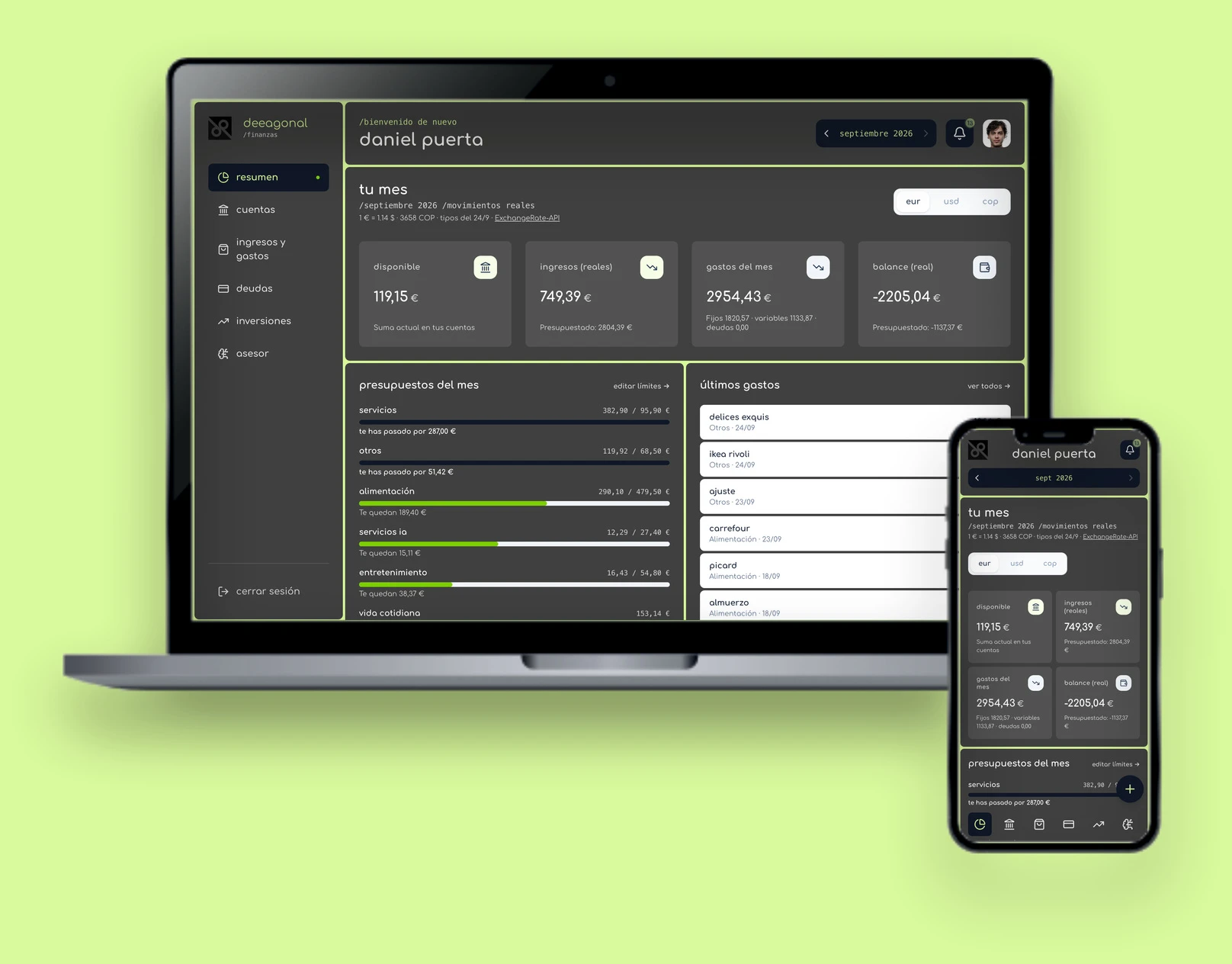
Where it gets used most: I use it daily on my phone. Installable as a PWA, checked down to 360 px wide with no horizontal scroll, and navigation in a six-icon bottom bar. Left, the month's overview; centre, quick capture; right, investments.

capture

four ways to log an expense

A finance app is only as good as its data, and the data depends on logging not being a chore. So half the work isn't in the screens but in the inputs: four paths, from most to least effort, that all end in the same save.

  1. 01

    the form

    The classic path, with account, category, date and notes. An expense paid from an account creates the expense, the account movement and the new balance together, in a single atomic write: either everything is saved, or nothing is.

  2. 02

    free text

    'lunch 12 revolut and uber 8.50 yesterday'. The server hands it to a small model that returns JSON with several expenses, relative dates and the named account; it validates it, and the app shows it as editable rows with what's left of each category's budget. If the AI doesn't answer, a local parser takes over: the first number, plus whatever category and account names appear in the text.

  3. 03

    apple pay, automatic

    An iPhone Shortcuts automation fires on every Wallet payment and sends amount, merchant and card to the server. It matches the card to an account by name, asks the AI for the category and saves expense, balance and movement in one transaction, flagged 'to review'. In the app, a 'to review · ok' pill appears, along with a notification.

  4. 04

    siri, by dictation

    'Hey Siri, log an expense', and whatever I dictate goes through the same interpreter as free text and the same save as Apple Pay. The server replies with a short sentence the shortcut reads aloud, so I know what was logged without looking at the screen.

features

what's inside

overview

« tu mes »
  • Four figures for the selected month (available, income, spending and balance), in whichever currency I pick: conversion is display-only.
  • Per-category budgets with their bar and what's left or over, then the latest expenses with category and date.
  • Below, the month's breakdown, a financial-health check and a collapsible analysis block: net worth, twelve-month projection, savings challenge and categories.
  • CSV export of income, expenses, debts or everything at once, prepared so Excel keeps the accents.
The monthly overview. The same tokens as deeagonal.com: lime background, dark-grey tiles separated by 4 px joints, and not a single capital letter.

income and expenses

« gastos variables · gastos fijos · ingresos »
  • Variable expenses, fixed expenses and income, each in its own currency.
  • Four budgeting strategies for variable spending: the 50/30/20 rule, frugal, real cash flow or a manual limit, with the month’s plan broken down and a warning when it’s exceeded.
  • Every movement has a type (variable, fixed, debt or investment), changeable from its pill; reclassifying keeps the expense ⇄ movement pair intact without duplicating anything.
With the 50/30/20 rule, the limit comes from income minus fixed costs and debts, and the bar shows how much has been used.

accounts, debts and investments

« cuentas · deudas · inversiones »
  • Bank accounts and cash, each in its own currency, with transfers between them that count as neither income nor spending.
  • Debts with interest rate, minimum payment and due day, sortable by rate to tackle the most expensive first, plus a repayment calculator.
  • Investments by asset class, with compound-interest projection and goals. A movement is entered as the balance the broker shows, and the app works out the difference: return, contribution or withdrawal.
Breakdown by asset class and a fifteen-year projection with adjustable return, horizon and monthly contribution.

advisor

« asesor financiero · planificación fiscal »
  • A financial advisor that receives the selected month's summary, with spending by category, real income and expenses, balances and debts, and always opens with 'In short', in at most three sections with small tables.
  • One-tap quick questions, and a history from newest to oldest, with earlier answers collapsed to their summary line.
  • A tax advisor that knows the Spanish, French, US and Colombian systems, and dual residence: salarié and auto-entrepreneur at once, the France–Colombia treaty, declaring assets held abroad.
  • Prompts are compacted, with no ids, technical timestamps or empty fields, and chat history is capped at ten turns, to fit the free tier.
The advisor, working on the month’s figures: summary first, diagnosis below, no emojis and rounded amounts.

screens

the rest of the app

Accounts: each balance in its own currency, converted into the display currency so they can be compared.
The tax advisor starts from a profile: country, status (here salarié and auto-entrepreneur at once) and, if needed, a second filing country.

stack

what's underneath

Interface

React 19 · TypeScript 5.8 · Vite 6 · Tailwind CSS 4 with the deeagonal design system · Motion · Recharts 3 · react-markdown with GFM tables · PWA via vite-plugin-pwa

Data

Firebase Auth with Google · Firestore with a persistent IndexedDB cache, offline too · rules limited to a single verified email · firebase-admin on the server

AI and integrations

Groq through its OpenAI-compatible API, no SDK · gpt-oss-120b for the advisors, gpt-oss-20b for parsing expenses and as a fallback on rate limits · iOS Shortcuts (Wallet and Siri) · ExchangeRate-API

Server / deployment

Express 4 · esbuild bundle · multi-stage Docker on node:22-slim · Coolify on a Hostinger VPS, with healthcheck · Vitest

architecture

three layers and two locks

The app reads and writes its data straight to Firestore; the server only exists for what can't live in the browser: the AI keys, the shortcuts' service account and the exchange rates. And since this is my money, everything has two independent locks: the Firestore rules only open my data tree to my verified email, and every /api route on the server checks the session token and the email on its own.

Client

React PWA · a single user

The whole interface. The local Firestore cache opens the app instantly with the latest data, offline too, and is wiped from the device on logout. On each deploy, an open app reloads itself into the new version.

↕ Firestore directly, under rules · /api with the Firebase ID token

Server

Express in Docker · Coolify

Advisors and expense parser, exchange rates with a 6-hour cache and two fallback sources, the shortcut endpoints, and a /__/auth proxy so Google sign-in runs from the app’s own domain once installed.

↕ keys live on the server only

Services

Firebase

Google Auth and Firestore. Rules: only my verified email, only my own tree.

Groq · ExchangeRate-API

Open models for advice and parsing, with a fallback on rate limits. Daily exchange rates, with attribution.

The iPhone shortcuts have no Firebase session: they use their own token, at least 32 characters long and compared in constant time, and the server writes to my data tree with firebase-admin.

engineering

six real problems and how they were closed

All of them showed up while using the app with my own money, not in testing. In a finance app the serious bugs are invisible: the screen shows a perfectly formatted number that is wrong.

a shortcut that said 'done' and saved nothing

integration
symptom
The Apple Pay automation finished without error, but the expense never appeared in the app and the server logged nothing.
cause
Shortcuts' 'Get Contents of URL' action sends a GET by default. The GET didn't match the API route and fell through to the app's catch-all route, which answered 200 with the page's HTML: as far as the shortcut knew, all was well.
fix
The shortcut routes answer 405 to any method other than POST, with a message saying which one to use, and every call leaves a log line with its reason: missing token, wrong token, invalid amount or expense saved.

the same expense, twice

data
symptom
The month's budgets didn't add up: depending on how an expense was entered, it counted twice or not at all.
cause
An expense paid from an account could come in as a variable expense or as an account movement, and they were independent records. Budgets only read the former, and I log almost everything as a movement.
fix
They are now a linked pair, where each side stores the other's id, created, edited and deleted together in one atomic write, whether it comes from the form, quick capture or Apple Pay. The month's spending merges both sources without counting anything twice, and older pairs without ids are matched by account, date, name and category. With tests.

changing currency rewrote the money

currency
symptom
Switching the base currency recalculated stored amounts at a fixed rate and overwrote them.
cause
The base currency was treated as data, when it is a display preference.
fix
Every amount is stored in its own currency (its account's, for movements) and only converted for display, at the day's rates, with fallback values flagged as stale if the source fails. Budgets carry their own currency. Written rule: never rewrite an amount when the currency changes.

buying an etf isn't spending

model
symptom
Every purchase inside the brokerage showed up as an expense and sank the month's balance.
cause
An outgoing movement could only be an expense or a transfer.
fix
A fourth type, investment: it lowers the account balance but counts in no total, no budget, and nothing the advisor sees. And in investments the form asks for the balance the broker shows, not the difference: the app works it out and decides whether it's a return, a contribution or a withdrawal.

pesos and dollars, same symbol

currency
symptom
An amount in Colombian pesos and one in dollars looked identical: both with '$'.
cause
It's the local symbol of both currencies.
fix
The peso is shown as 'COP', including in the Apple Pay shortcut's confirmation sentence.

safari zoomed in while typing

mobile
symptom
On the iPhone, tapping a field zoomed the page in and left it there, overflowing to the right.
cause
Safari zooms when focusing a field whose text is smaller than 16 px.
fix
Two defences, and both are needed: 16 px fields on touch screens and maximum-scale=1 in the viewport. Pinch-to-zoom still works.

code

where the complexity lives

App.tsx
10 461
server.ts
942
services/aiService.ts
196
lib/spend.ts
150
AuthContext.tsx
138
5 other files
178

Lines per file, out of 12,065. The whole interface lives in a single App.tsx of more than ten thousand lines: it's the project's declared technical debt. What can't be touched without a test, meaning months, currencies, expense pairing and investment movements, has already moved to src/lib/ with its 37 tests; splitting App.tsx by screen is next.

judgement

what I take away

logging is the product

Charts are the easy part. What makes a finance app useful is that logging takes one gesture: everything else depends on it.

currency is for display

An amount is stored in its own currency, once. Converting is the screen’s job; any other rule ends up rewriting money.

money bugs are invisible

A miscalculated figure comes out as nicely formatted as a correct one. That's why the arithmetic lives outside the interface, under test, and the advisor receives exactly the totals I see.

The figures in every screenshot are fictitious: each amount is multiplied by the same factor, so they stay consistent with each other, but they aren't mine. Private app, private repository.

Installable (PWA) Mobile app API integrations Automatic Apple Pay expense capture Expenses dictated to Siri AI financial advisor Multi-currency
stack

React·TypeScript·Vite·Tailwind CSS·PWA·Express·Firebase·Groq·Vitest·Node.js·Docker

a similar
project?

let's talk